
Audible: Audiobooks & Podcasts
Audible, Inc.Books & Reference
4.6265.73K Reviews
- Version
- Varies With Device
- Installs
- 100.00M
- Age Rating
- Teen
Screenshots


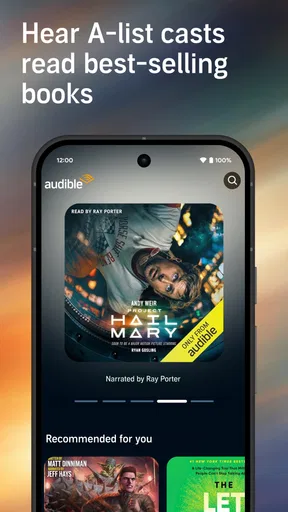
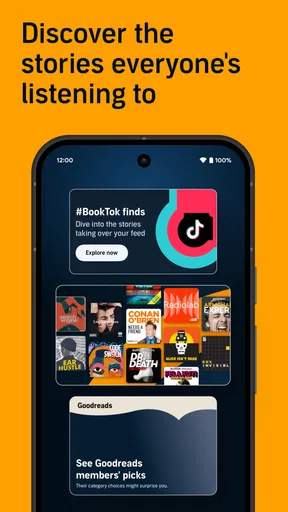
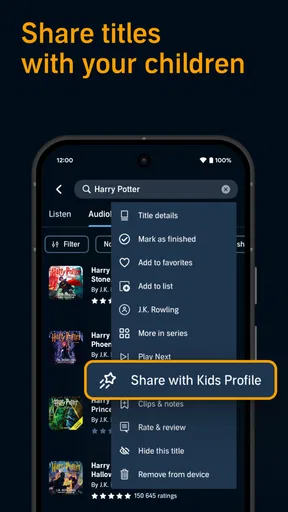



Our Review of Audible: Audiobooks & Podcasts
 Analysis by Appyee
I find audio works best when it fits into moments that would otherwise be hard to use for reading: a walk, a commute, or a familiar chore. Audible: Audio Entertainment is built around that kind of listening, bringing spoken books and podcasts into one app. It is a Books & Reference app from Audible, Inc., and the choice is broad enough that I can move between a long story and something shorter when my available time changes. That flexibility is the main reason I would recommend trying it, though the experience depends more on a steady listening routine than on simply installing an app.
Where a connection changes the experience
Browsing, choosing a title, and starting something new are the moments when a reliable internet connection matters most. I prefer to find my next listen before I leave home rather than wait until I am already on a train or stepping outside. That small habit avoids turning a short break into time spent searching through a catalog on a patchy signal.
The app is most satisfying when listening feels continuous. A walk through a neighborhood or a stretch of housework is a natural place for a book; a podcast can be easier to fit into a brief gap. If reception is inconsistent, I would plan ahead and check that the title is ready for the way I intend to listen, rather than assume every network situation will behave the same way. Thinking ahead about connectivity makes the app feel much less dependent on luck.
Listening in the middle of real life
A realistic routine might be to pick a chapter before a morning commute, listen while walking to a stop, then pause when the day demands attention. Later, a podcast can fill a shorter trip home without requiring me to remember exactly where I was in a lengthy book. For chores, I tend to choose something I can follow without looking at the screen, since stopping to browse or change titles is inconvenient when my hands are occupied.
That distinction helps with choosing what to play. A complex novel may reward a quiet walk or a relaxed evening, while a familiar subject or a conversational podcast is easier to follow around household noise. I would not treat every title as interchangeable background sound: if I keep losing the thread, the problem may be the listening setting rather than the narration. Saving more demanding stories for calmer stretches makes the experience more enjoyable.
What to do when listening is interrupted
Mobile listening is rarely perfectly uninterrupted. A call, a change in signal, or simply arriving somewhere can break a session. I find it useful to pause deliberately when I know I need to switch tasks, rather than leave audio running while attention has moved elsewhere. When I return, I can resume with a clearer sense of what I last heard instead of wondering whether I missed an important passage.
If something will not start as expected, I would first check the connection and try again once it is stable. For a trip or a place where reception may be unreliable, preparing in advance is a more sensible approach than troubleshooting on the move. The app’s sleep timer is also useful for a different kind of interruption: when I listen in bed, I can set a stopping point rather than wake to find playback continuing long after I drifted off.
Making choices with data and attention in mind
Streaming audio can use mobile data, so I avoid casually starting unfamiliar titles when I am trying to conserve a limited plan. I browse and make choices when I have access to a dependable connection, then use the listening options available in the app to prepare for the session. That is a practical habit, not a guarantee about how much data any particular title or listening session will use; the sensible choice depends on a person’s plan and settings.
There is also an attention cost to consider. A long audiobook can be excellent company during a repetitive task, but it is a poor match for work that needs careful thought or for any situation where listening would distract from safety. I would never let a story compete with traffic, directions, or an important conversation. The best use is not squeezing audio into every spare second; it is choosing moments when I can actually enjoy it.
How the listening experience holds up
So, I decided to give Audible a whirl because, like many of you, I wanted to make my daily commute and chores a bit more productive. And wow, was I pleasantly surprised! Audible offers a massive library of audiobooks, podcasts, and original content. Seriously, it’s like having a library in your pocket without the late fees.
Easy Peasy Setup
Setting up the app was a breeze. I just downloaded it from the app store, signed up, and was instantly browsing a vast collection of titles. The user interface is clean and intuitive, which made navigating through genres and recommendations super straightforward.
A World of Content
One of the things I love most is the sheer variety. Whether you’re into thrillers, self-help, or romance, there’s something for everyone. I even stumbled upon some exclusive Audible Originals which are pretty cool if you’re looking for something fresh and unique. Plus, the app also offers podcasts, so you can switch things up if you ever fancy a break from books.
User-Friendly Features
The app’s features are designed with the user in mind. You can download titles for offline listening, which is perfect for those dreaded no-signal zones. There’s also a handy sleep timer, so you can drift off to your favorite narrator without worrying about losing your place.
For a more reliable routine, I would choose a title and prepare it before leaving a strong connection, especially if I know I will be underground or travelling through areas with weak reception. I also like matching the content to the setting: something easy to follow for a noisy commute, and a more absorbing book for a quiet walk. Those small choices help avoid the frustration of discovering mid-journey that I have not planned for the conditions.
Performance and Quality
In terms of audio quality, Audible doesn’t disappoint. The sound is crisp, and the narrators are top-notch. It really makes you feel like you’re part of the story. Also, the app runs smoothly, and I haven’t experienced any glitches or crashes so far, which is always a plus.
Audio quality is only one part of whether a title works for me. Narration style, pacing, and the amount of attention a book demands can make a bigger difference during everyday listening. I usually give a new selection a short trial in a setting where I can concentrate; if I find myself repeatedly rewinding or losing track, I save it for later and pick a simpler listen for the current task.
Who will get the most from it
This app is a strong fit for readers who want to make use of time when their eyes and hands are busy, and for listeners who like moving between books and podcasts without switching to a separate service. Its catalog can also help someone explore subjects or genres they would not normally pick up in print. The app has been around since Aug 12, 2010, and its 100M+ installs suggest it has reached a large audience; it holds a 4.6 average from around 1.7 million ratings.
It is less compelling if you mainly want to read silently, borrow books through a local library, or listen only to free material. A library’s audiobook service may be a better first stop for someone who already has access to one and wants to avoid in-app purchases. Audible is free to install, but in-app purchases range from $0.49 to $279.99 per item, so I would check the cost of a specific title before committing. The Teen content rating is another useful point for families deciding whether the app suits a younger listener.
Compared with a music-streaming app, Audible is focused on following spoken content rather than building a soundtrack for every mood. Compared with podcasts alone, it puts full-length books alongside shorter listening. That makes it convenient for people who want both, but it does not automatically make it the best choice for every listener: someone who only wants casual, short-form audio may be happier with a podcast-focused option, while a print-first reader will get more from an ebook or physical book.
Small habits that make a difference
I would keep a short mental shortlist of what suits different situations instead of repeatedly browsing when I have only a few minutes. One title can be reserved for focused listening, another for chores, and a podcast for a brief errand. This is especially useful when connectivity is uncertain: deciding in advance reduces the need to load new pages or sample options at the point when I want to press play.
Another useful trade-off is choosing a long book for continuity versus shorter episodes for flexibility. A novel can make a commute feel like part of a larger story, but missing a session may make it harder to remember the plot. Podcasts are easier to dip into, though not every episode will be equally interesting. I would choose according to how regularly I expect to listen, not just which title looks appealing in the moment.
For people sharing a home or a device, it is worth making listening choices deliberately rather than assuming everyone wants the same queue. The app’s playlist-oriented approach suits listeners who like to line up different kinds of audio, but a playlist is most useful when its order reflects the day: a short selection first, a longer story later. That simple arrangement can reduce screen time once I have started moving around.
Wrapping It Up
All in all, Audible: Audio Entertainment is a fantastic tool for anyone looking to immerse themselves in the world of stories without having to flip a page. It’s convenient, expansive, and just plain fun. Whether you’re a bookworm or a casual listener, I’d say give it a shot. You might just find your next favorite book!
My recommendation comes with one condition: think about where and how you listen. If you can plan around your connection, choose titles suited to your surroundings, and check purchase costs before buying, the app can turn commutes and repetitive chores into genuinely enjoyable listening time. If you need a completely free catalog, prefer print, or do not want audio competing for your attention, another format may suit you better. For everyone else, it is an inviting way to fit stories and spoken programs into the day without pretending that every moment needs a soundtrack.
Privacy and Permissions
See what permissions an app requests and how it handles your data.
- Identity
- find accounts on the device, add or remove accounts
- Contacts
- find accounts on the device
- Phone
- read phone status and identity
- Photos/Media/Files
- read the contents of your USB storage, modify or delete the contents of your USB storage
- Storage
- read the contents of your USB storage, modify or delete the contents of your USB storage
- Camera
- take pictures and videos
- Microphone
- record audio
- Wi-Fi connection information
- view Wi-Fi connections
- Device ID & call information
- read phone status and identity
- Other
- view network connections, create accounts and set passwords, pair with Bluetooth devices, change network connectivity, allow Wi-Fi Multicast reception, connect and disconnect from Wi-Fi, full network access, change your audio settings, run at startup, use accounts on the device, control vibration, prevent device from sleeping
How Audible: Audiobooks & Podcasts Compares
Full ComparisonChoose Google Play Books for books and audiobooks without a subscription, Kindle for a broad ebook library and reading tools, or Audible for a dedicated audiobook and podcast service.
| App | Developer | Rating | Price |
|---|---|---|---|
 Google Play Books & Audiobooks | Google LLC | 4.7 | Free |
 Amazon Kindle: Reading App | Amazon Mobile LLC | 4.8 | Free |
 Audible: Audiobooks & PodcastsThis App | Audible, Inc. | 4.6 | Free |
Verdict
Strengths of Audible: Audiobooks & Podcasts
- Extensive library of audiobooks and podcasts.
- High-quality narration enhances enjoyment.
- Offline listening for convenient access.
- Customizable playback speeds available.
- Seamless integration with Alexa devices.
Limitations of Audible: Audiobooks & Podcasts
- Subscription required for full access.
- Some titles have limited availability.
- App interface can feel cluttered.
- Downloading can consume significant storage.
- Not all features available offline.
Similar Picks in This Category
View All
Google Play Books & Audiobooks
Google LLC4.7

네이버 - NAVER
NAVER Corp.3.5

Wattpad - Read & Write Stories
Wattpad.com3.7

King James Bible - Verse+Audio
Ozion4.8

Bible Offline-KJV Holy Bible
Bíblia Offline4.9

Amazon Kindle: Reading App
Amazon Mobile LLC4.8
You May Also Like
View All

Frequently Asked Questions
What is Audible and what can I do with it?
Audible is an audiobook and spoken word entertainment platform that offers a vast library of audiobooks, podcasts, and exclusive content. Users can listen to their favorite books on the go, discover new authors, and enjoy original audio series. It’s perfect for multitasking, as you can listen while commuting, exercising, or relaxing.
How does the Audible subscription model work?
Audible offers a subscription model where users pay a monthly fee to receive credits. These credits can be exchanged for audiobooks, regardless of their price. Members also enjoy access to Audible Originals and exclusive discounts. Non-members can purchase audiobooks directly, but the subscription offers more value for avid listeners.
Can I listen to Audible content offline?
Yes, Audible allows users to download their audiobooks and podcasts for offline listening. This feature is particularly useful for those who travel frequently or have limited internet access. Simply download the content while connected to Wi-Fi, and enjoy it anytime without worrying about data usage or connectivity issues.
What devices are compatible with Audible?
Audible is compatible with a wide range of devices, including smartphones, tablets, computers, and smart speakers. The Audible app is available on both Android and iOS platforms, making it accessible for most mobile users. Additionally, Audible integrates with Amazon Alexa, allowing for hands-free listening on Echo devices.
Is there a free trial available for new users?
Yes, Audible offers a 30-day free trial for new users. During this period, users receive one free audiobook and access to Audible Originals. This trial allows potential subscribers to explore the platform without any financial commitment, helping them decide if Audible meets their listening preferences and needs.
